DevOpsOct 08, 2024
How to Hire a DevOps Engineer: Skills, Steps, and Cost
How to find and hire DevOps engineers: what the role covers, skills by level, where to source candidates, interview questions, salaries by country, and vendor options.
Hire
Hire by role
Hire Front-end developers
Hire Back-end developers
Hire Full-stack developers
Hire Android developers
Hire iOS developers
Hire Mobile developers
Hire AI engineers
Hire by skill
Hire JavaScript developers
Hire React Native developers
Hire React.js developers
Hire .NET developers
Hire TypeScript developers
Hire Flutter developers
Hire Golang developers
Hire by country
Devs in Ukraine
Expirienced engineers with strong product focus and fast integration.
Devs in Poland
EU-based developers with reliable delivery and high standards.
Devs in Argentina
Senior engineers with strong technical depth and timezone alignment.

Summarize with:

Leave your email and we will inform you about all our news and updates
DevOps — a portmanteau of "development" and "operations" — is a way of building and running software in which the people who write code and the people who operate it work as one team, with automation carrying every change from commit to production.
This guide explains the DevOps process end to end: the phases of the workflow, the practices and tools at each stage, how teams are structured, how to tell where you are on the maturity curve, and the practices that separate teams that ship daily from teams that dread releases.
In short: the DevOps process is a continuous loop of eight phases — plan, code, build, test, release, deploy, operate, monitor — connected by automation and fast feedback. Every change passes through the same pipeline: version control triggers an automated build and test, a release is promoted through environments by a deployment pipeline, and production monitoring feeds back into the next planning cycle. The four pillars are continuous planning, continuous integration, continuous delivery and continuous monitoring.
DevOps is both a culture and a set of engineering practices. The culture part: development and operations share responsibility for the product from idea to production, instead of handing work over a wall. The engineering part: everything repeatable is automated — builds, tests, infrastructure, deployments, monitoring — so that releasing software becomes routine rather than an event.
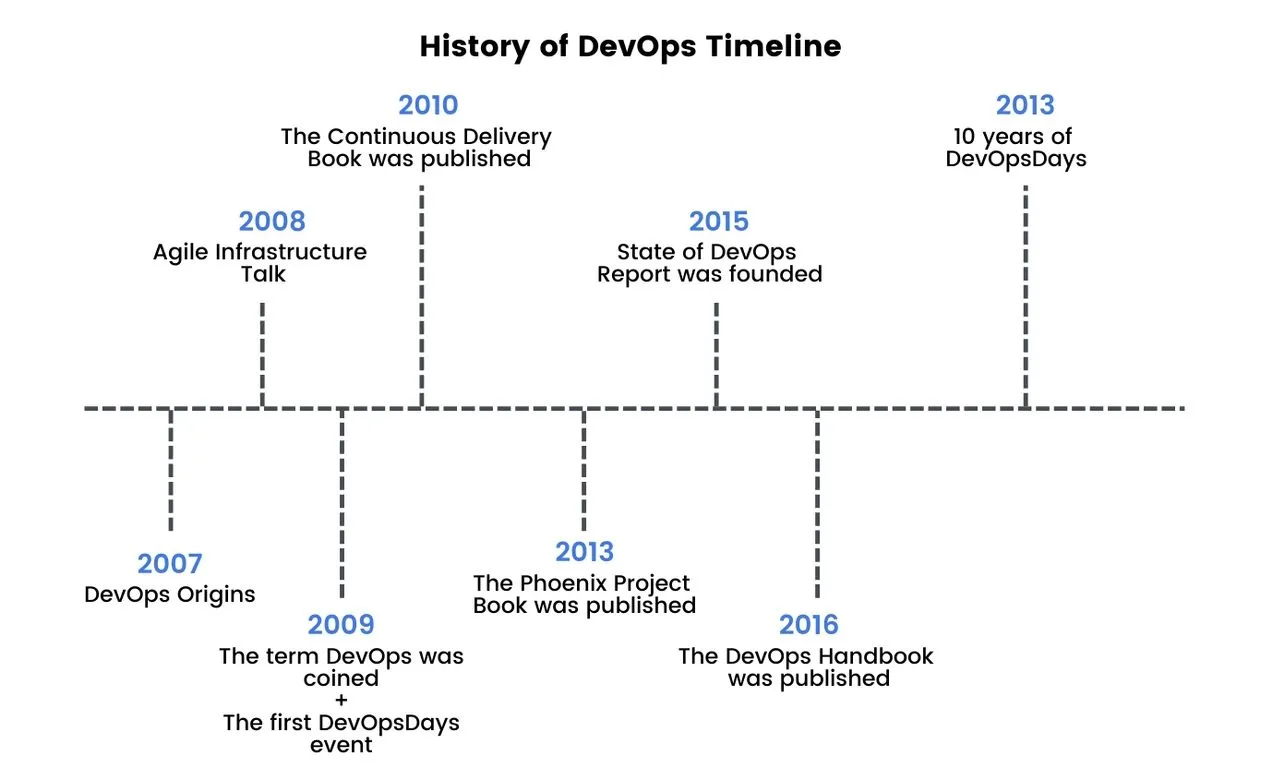
The idea took shape between 2007 and 2009. In 2009 John Allspaw and Paul Hammond presented "10+ Deploys per Day: Dev and Ops Cooperation at Flickr" at the Velocity conference, and Patrick Debois organised the first DevOpsDays in Ghent, giving the movement its name. Jez Humble and David Farley's
The contrast with the traditional model is the point. Before DevOps, a development team finished a release and handed it to an operations team that had not seen it before; integration happened late, deployments were manual, and every failure started an argument about whose fault it was. DevOps replaces the handover with a shared pipeline and shared accountability.
The DevOps lifecycle is drawn as an infinity loop because it has no end: what monitoring reveals in production becomes the input to the next planning phase.

Two points the diagram hides. First, the phases overlap: in a mature pipeline a single commit moves through build, test, release and deploy in minutes without anyone touching it. Second, the loop is only as fast as its slowest manual step — which is why the practices below are mostly about removing manual steps.
The eight phases are often summarised as four continuous activities. The grouping is useful because each "C" is owned by a recognisable set of practices and tools.
Development and operations plan together. The backlog includes operational work — capacity, security, observability — alongside features, and the definition of done includes "deployable and monitored", not just "code complete". In practice this means product, engineering and ops agree priorities in one place and ops constraints are visible before a feature is built, not after it fails in production.
Every developer merges small changes into the main branch at least daily, and every merge triggers an automated build and test run. CI is what makes integration problems cheap: a conflict discovered after an hour's work takes minutes to fix; one discovered after a month of parallel work can take weeks. The practical rules are short-lived branches, a build that completes in under ten minutes, and a culture of fixing a broken build before doing anything else.
Continuous delivery means every change that passes CI is automatically packaged and promoted through environments so that it

Whichever strategy you use, the pipeline must be able to roll back automatically when error rates or latency cross a threshold. A deployment you cannot undo in minutes is not continuous delivery; it is a faster way to cause an outage.
Production is instrumented for metrics, logs and traces; alerts fire on symptoms users would notice, not on every CPU spike; incidents end with a blameless post-mortem whose actions go into the backlog. The feedback loop also includes users — support tickets, usage analytics, surveys — so that what gets planned next is driven by what actually happened. This closes the loop back to planning and makes the lifecycle continuous rather than a sequence.
The practices change with the tooling; the principles behind them have been stable for fifteen years.
Microservices deserve a caveat: they are an architecture choice that DevOps makes possible, not a requirement. A monolith with a trustworthy pipeline is far better than microservices with manual deployments.
No single tool "does DevOps"; the toolchain is a set of integrations, and consistency matters more than brand. The table lists the categories you need and the tools most often used in each.
Three rules for choosing: prefer tools that integrate with the Git platform you already use; keep the number of tools small enough that one engineer can hold the whole pipeline in their head; and make every tool's configuration live in version control. If you are starting from zero, GitHub or GitLab plus Terraform, Docker, Kubernetes and Prometheus/Grafana cover 80% of teams — and Devico's DevOps automation services start from exactly that baseline.
For most teams, security used to be a final checkpoint — a review gate before release that slowed everything down and occasionally killed a launch date. DevSecOps embeds security into every stage of the CI/CD pipeline instead. The principle is simple: a vulnerability caught at commit takes minutes to fix; the same one found in production costs weeks of remediation, regulatory exposure and customer trust.
What DevSecOps looks like in practice:
The cultural shift matters as much as the tooling. Security is a shared responsibility across development, operations and security teams rather than a handoff between them: developers are trained to write with security in mind, and security engineers contribute to pipeline design rather than sitting downstream of it. IBM's Cost of a Data Breach research consistently finds that organisations with extensive security automation contain breaches faster and at substantially lower cost than those relying on manual processes. For companies in regulated industries — fintech, healthcare, enterprise SaaS — DevSecOps is a baseline requirement, not a differentiator. The full comparison is in DevOps vs DevSecOps.
One of the most common mistakes in adopting DevOps is treating it as a tooling problem when it is fundamentally a people-and-structure problem. You can buy the best CI/CD stack on the market and still ship slowly if the wrong people own the wrong responsibilities — or if nobody owns them.
DevOps engineer. The operational core of the function: builds and maintains CI/CD pipelines, manages infrastructure as code, and ensures the path from commit to production is fast, automated and reliable. In smaller teams this role absorbs platform and SRE responsibilities.
Site reliability engineer (SRE). Owns reliability, availability and performance at scale: defines SLOs, leads incident response, runs blameless post-mortems and automates away operational toil.
Platform engineer. Builds the internal developer platform — standardised tooling, environments and abstractions that let application developers ship without deep infrastructure knowledge.
Security engineer (DevSecOps). Owns security integration across the pipeline, from SAST in CI to runtime monitoring in production, working upstream with developers rather than as a release gatekeeper. In smaller teams, shared between the DevOps engineer and an application-security specialist.
Automation / QA engineer. Owns the test automation layer that makes continuous delivery trustworthy — unit, integration, end-to-end and regression suites that run on every build. Without it, CD pipelines ship fast but unreliably, which is often worse than shipping slowly.
Build, hire or outsource? For most scaling companies the honest answer is a hybrid: core application development stays in-house, while pipeline architecture, infrastructure and SRE are areas where external engineers — to build the foundation or to augment an existing team — consistently deliver faster than hiring sequentially. Time-to-hire for a senior DevOps engineer runs three to five months in most markets, and pipeline debt compounds daily in that window. The organisational models — embedded, enabling, platform — are compared in how to build an effective DevOps team structure.
Understanding DevOps in theory is one thing. Knowing where your organisation actually sits on the maturity curve — and what it takes to move up — is what separates companies that ship faster every quarter from those stuck in the same bottlenecks year after year. Based on Devico's work with teams across fintech, healthcare, SaaS and enterprise, we use five levels that map to observable behaviour. Most organisations overestimate their level.
Level 1 — Ad hoc (firefighting). Deployments are manual, infrequent and stressful. Dev and ops interact only when something breaks. Testing is manual and late. There is no trusted CI/CD pipeline.
Level 2 — Managed (process exists, but fragile). Git and a basic CI pipeline are in place, but automation is partial and deployments still need manual intervention. Ownership of failures is blurry.
Level 3 — Defined (reliable, not yet fast). CI/CD is trusted; automated tests cover critical paths; deployments happen on a cadence without heroics. Monitoring is reactive; IaC is partial; DevSecOps is on the roadmap.
Level 4 — Advanced (speed with stability). Commit-to-production is automated end to end with blue-green or canary strategies; security is in the pipeline; infrastructure is fully codified; monitoring is proactive. The team measures DORA metrics and uses them to make decisions.
Level 5 — Elite (continuous everything). The cohort DORA calls elite: continuous automated deployment, tight feedback from production into planning, AI-assisted testing, predictive incident detection, automated rollback, chaos engineering used proactively. The whole organisation — not just engineering — is aligned around delivery metrics.
Where do most companies land? The majority of growing software teams come to us between Level 2 and Level 3: they have tooling and intentions, but the system is not trusted enough to move fast without anxiety. The jump from 3 to 4 is where outside expertise pays for itself fastest, because the architectural decisions at that stage either compound your speed or compound your technical debt. How to measure your level with the four DORA metrics is in DevOps KPIs and metrics; a structured readiness check is in DevOps transformation: 5 factors to identify readiness.
The practices below are what Level 4 and 5 teams have in common. None requires a particular tool.
If you are at the start of this journey, the sequence matters: assess readiness, pick a pilot team, automate its path to production, measure, then scale. The step-by-step version — with timelines — is in our guide to implementing DevOps in your organization, and the five readiness factors are in DevOps transformation: 5 factors to identify readiness. Teams that would rather not learn by trial and error can start with Devico's DevOps consulting, which produces the assessment and the roadmap before any tooling is touched.
The DevOps process is a loop, not a line: plan, code, build, test, release, deploy, operate, monitor — and back to plan, informed by what production showed. The practices that make the loop fast are the same everywhere: version control for everything, continuous integration, automated delivery, infrastructure as code, observability and security built into the pipeline. The structure that makes it stick is shared ownership between development and operations, with the right roles added as the team grows. And the measure of whether it is working is not the toolchain but the four DORA metrics — how often you deploy, how long a change takes, how often it fails and how fast you recover.
The DevOps process is a continuous software delivery loop in which development and operations share responsibility and automation carries each change from commit to production. It consists of eight phases — plan, code, build, test, release, deploy, operate, monitor — grouped into four continuous activities: planning, integration, delivery and monitoring.
Plan (agree the work), code (write it in version control), build (compile and package automatically), test (automated checks in the pipeline), release (gate and package a deployable version), deploy (promote it to environments without downtime), operate (run it at the expected service level) and monitor (observe and feed results back into planning).
Continuous planning, continuous integration, continuous delivery (or deployment) and continuous monitoring. Together they describe the lifecycle as four activities that never stop rather than as a sequence of project phases.
CI/CD is the technical core of DevOps — the automated pipeline that integrates, tests and deploys changes. DevOps is the wider practice that includes CI/CD plus shared ownership between development and operations, infrastructure as code, monitoring, incident management and the culture that holds them together. You can have CI/CD without DevOps; you cannot have DevOps without CI/CD.
Automating the full path to production, working in small batches on a trunk, keeping infrastructure and pipelines as code, building a fast and trusted test suite, shifting security left, making deployments reversible, instrumenting for user-facing symptoms, running blameless post-mortems and measuring the four DORA metrics.
A single team can get a trusted CI/CD pipeline and automated deployments in two to three months. Moving an organisation from ad hoc (Level 1) to advanced (Level 4) on the maturity ladder typically takes 12–24 months, because the constraint is culture and skills rather than tooling. Bringing in experienced DevOps engineers for the foundation usually halves the first phase.
Still have a question?
Talk to us